Wireguard VPN providers can get access to your other VPNs and LAN with this AXE7800 router via VPN Fusion
While I was playing with my new ASUS RT AXE7800 I've found out that when using VPN Fusion and connecting to any Wireguard server, this VPN server will get an access to your entire LAN and your other VPNs. Despite advertising this router as safe, it may actually pose a danger to the intranet of your company. There's no robust way for you to protect your network in this scenario and the support remains hesitant.
I've used ASUS RT AXE7800 with stock firmware 3.0.0.4.388_25127 when I came upon the issue. For VPN I've used Wireguard.
Reproducing the issue
LAN
Connect a client device to the router, a PC preferably. Make sure it can connect to WAN. In my case LAN address is 192.168.97.0/24 and the device has an address 192.168.97.222.
VPN servers
Prepare two Wireguard VPN servers on WAN side of a router and configure them like:
VPN0:
[Interface]
PrivateKey = <VPN0 server's private key>
Address = 10.0.0.1/24
ListenPort=51820

[Peer]
PublicKey = <router's public key>
AllowedIPs = 10.0.0.2/32,192.168.97.0/24,10.0.1.0/24
VPN1:
[Interface]
PrivateKey = <VPN1 server's private key>
Address = 10.0.1.1/24
ListenPort = 51820

[Peer]
PublicKey = <router's public key>
AllowedIPs = 10.0.1.2/32,192.168.97.0/24,10.0.0.0/24
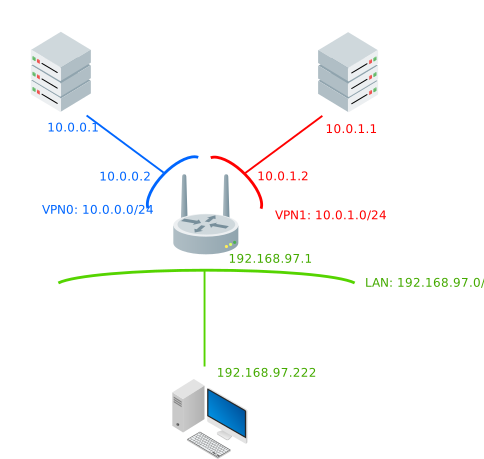
So each VPN has its own address (10.0.0.0/24 for VPN0; 10.0.1.0/24 for VPN1) and in both first available IP address is a server, while second is a router. For allowed IPs for router it's its own VPN address, whole another VPN's address and a whole LAN address.
Note I've not mentioned how to get the keys. For that I recommend a basic introduction to the wg.
VPN Fusion
Now in the router's web GUI connect to the VPN servers. Do not add any devices to any connection.
I've set them up like this:
For VPN0:
[Interface]
PrivateKey = <router's private key>
Address = 10.0.0.2/24

[Peer]
PublicKey = <VPN0 server's public key>
AllowedIPs = 10.0.0.1/32
Endpoint = <server's public ip>
PersistentKeepalive = 25
For VPN1:
[Interface]
PrivateKey = <router's private key>
Address = 10.0.1.2/24

[Peer]
PublicKey = <VPN1 server's public key>
AllowedIPs = 10.0.1.1/32
Endpoint = <server's public ip>
PersistentKeepalive = 25
Note for both configs I've set up keepalive period. That's because I have my router behind CGNAT and I need it for sever to be able to talk to it.
Testing the connections
Connections
To make it easier to imagine what's going on, I've put the current topology setup on the image below:
Expectations vs reality
When setting up the VPN Fusion first time I had some expections in mind, which were not met:
The VPN0 will not have access to VPN1 and vice versa
If I work for a company A and my wife does for B and we both decided to use VPN Fusion to do so because it was advertised as safe, then there is a possibility for the two networks to connect to each other. Moreover, if we decide for some reason that using a VPN for playing games or watching some series will be a good idea, we are risking this VPN accessing our companies network.
Traceroute results:
VPN0 > traceroute 10.0.1.1
traceroute to 10.0.1.1 (10.0.1.1), 30 hops max, 60 byte packets
1  10.0.0.2 (10.0.0.2)  32.651 ms  32.491 ms  32.412 ms
2  10.0.1.1 (10.0.1.1)  65.790 ms  65.743 ms  65.691 ms
---
VPN1> traceroute 10.0.0.1
traceroute to 10.0.0.1 (10.0.0.1), 30 hops max, 60 byte packets
1  10.0.1.2 (10.0.1.2)  33.196 ms  33.289 ms  33.275 ms
2  10.0.0.1 (10.0.0.1)  64.535 ms  64.522 ms  64.602 ms
The VPN will not have access to devices which are not assigned to the tunnel in VPN Fusion
I don't always trust a VPN. If I connect to something not self-hosted, then I want to be able to be selective about what devices will this VPN have access to. If you connect your PC to the VPN directly, it's only your PC that is possible to connect to from VPN's side. If you connect this router, VPN can get access to your PC, NAS, router admin panel (even if you disabled WAN access), vaccum cleaner, fridge and basically everything you have in your LAN.
Traceroute results:
VPN1> traceroute 192.168.97.222
traceroute to 192.168.97.222 (192.168.97.222), 30 hops max, 60 byte packets
1  10.0.1.2 (10.0.1.2)  33.616 ms  33.595 ms  33.569 ms
2  192.168.97.222 (192.168.97.222)  34.086 ms !X  34.180 ms !X  34.294 ms !X
Schema
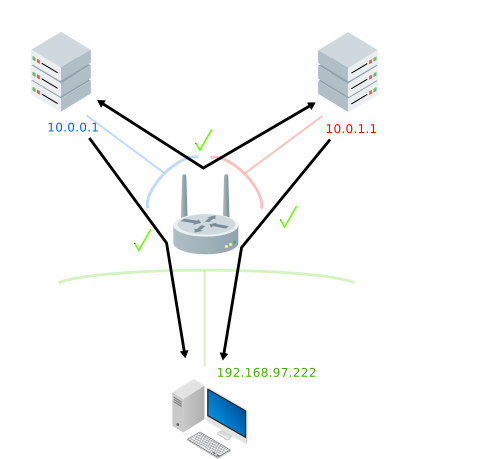
I've put all the connections that pass through, although in my opinion they shouldn't just to illustrate the problem better.
Security risks
You'll have to know the addresses of the other networks to exploit these, but it's not impossible to:
- You can be exposing your company's network to attack from other VPNs you are connected to
- Anyone on any VPN you are connected to will have full access to your LAN
Fixing this
- first thing I've went to was the Web GUI's firewall, but you cannot operate on whole ranges there. In our examples we could just block 10.0.0.1 and 10.0.0.2 from contacting 192.168.97.222, but don't remember that you can have tens, hundreds, thousands of devices on these networks. Good luck writing all that, one at a time. Also you have rules limit there.
- second thing was to go router's ssh management and change iptables manually. It worked perfectly, but the changes through SSH are volatile and disappear after reboot. No way to save them as far as I know.
- Even if firewall and the iptables were solutions I keep in mind that most people are not advanced router users and might never be even aware of the dangers.
At the moment there's no robust way to set up a good protection, as far as I know. I write this article on 24th of November, I've created a support ticket on 10th of October and still got no more info than to update the firmawe version that came out in between. The fact that the SSH changes are volatile and there's no way persisting them was a huge surprise for me, because even advanced user can't do much to fix the exploits on their own.
References
- Router icons come from: https://vecta.io/symbols/37/basic-network (opens in a new tab)
- Graphics made with Inkscape
- ASUS official router's page: https://www.asus.com/networking-iot-servers/wifi-routers/asus-wifi-routers/rt-axe7800/ (opens in a new tab)